
 Join our Discord
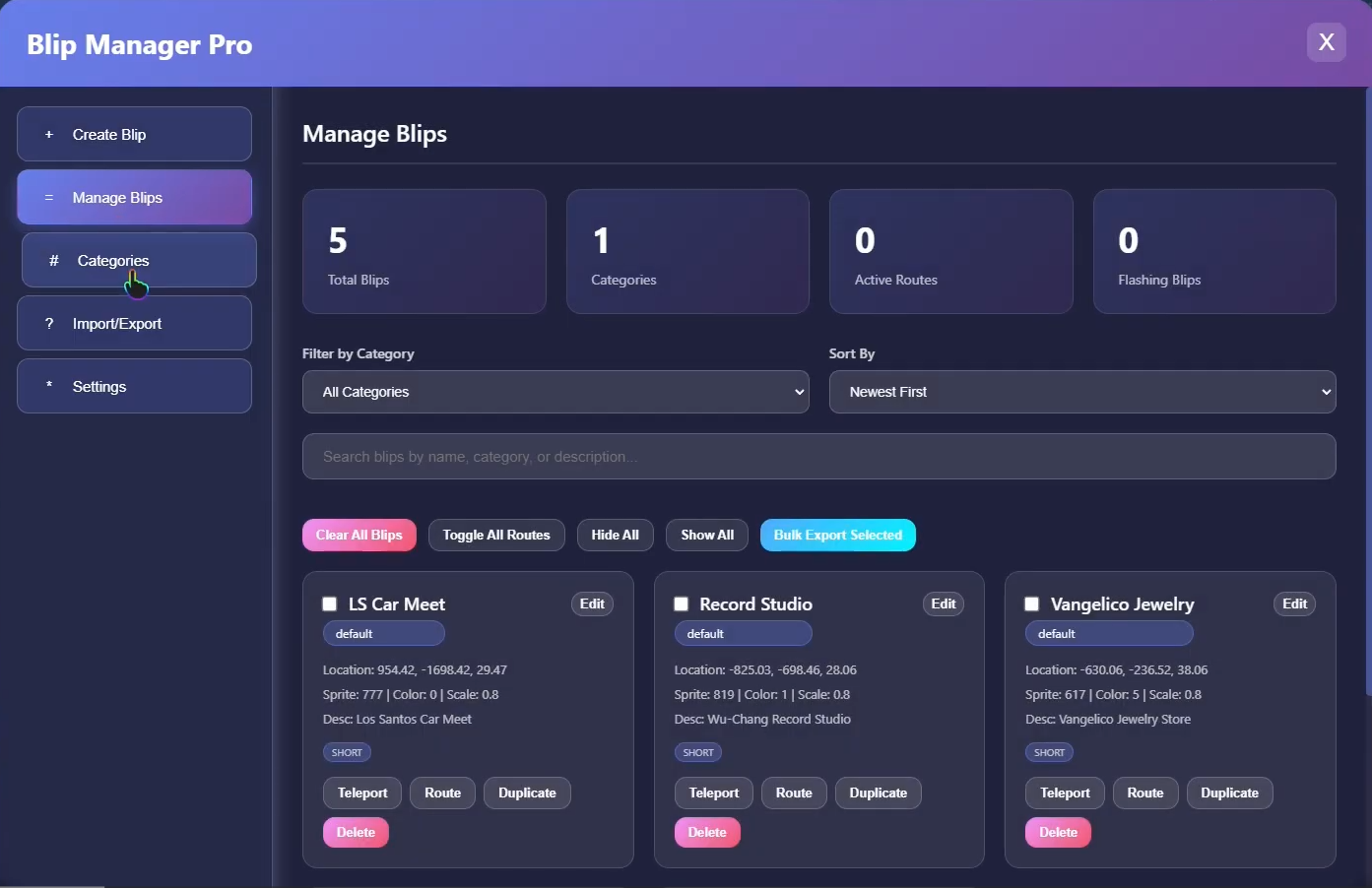
Transform your FiveM server's map experience with the most advanced and feature-rich blip management system available! This premium resource delivers professional-grade blip creation, organization, and customization with an intuitive interface that makes map management effortless.
YouTube Preview: https://www.youtube.com/watch?v=oKRYeMv8VTk
✨ Core Features
Comprehensive Blip Database
- 820+ Available Sprites - Every GTA V blip icon organized by category
- 86+ Color Options - Complete color palette from the game
- 25 Categorized Groups - Organized sprite library (Shops, Emergency, Vehicles, Properties, Activities, Business, Heists, Racing, Combat, and more)
- Advanced Search System - Find any sprite instantly by name or category
- Visual Sprite Picker - Browse sprites with real-time preview
Professional Blip Creation
- Intuitive Form System - Create blips in seconds with guided inputs
- Live Preview Mode - See your blip on the map before creating
- Current Location Detection - One-click coordinate capture
- Coordinate Management - Copy, paste, and save coordinate templates
- Advanced Options Panel - Fine-tune every aspect of your blips
- Batch Import/Export - Transfer blips between servers or create backups
Smart Organization Tools
- Category System - Group blips logically for easy management
- Toggle Categories - Show/hide entire groups with one click
- Search & Filter - Find blips instantly by name, category, or description
- Sort Options - Organize by newest, oldest, name, or distance
- Statistics Dashboard - Track total blips, categories, and active routes
- Bulk Operations - Manage multiple blips simultaneously
MySQL Database Integration
- Server-Wide Persistence - Blips saved to database for all players
- Real-Time Sync - Changes propagate to all online players instantly
- Automatic Backups - Optional auto-backup system included
- Import/Export System - JSON-based data portability
- Optimized Queries - Efficient database operations
- oxmysql Support - Modern, reliable database integration
🎮 Gameplay Mechanics
Player Experience
- Interactive UI - Modern, responsive interface with smooth animations
- Blip Card System - Visual cards showing all blip details at a glance
- One-Click Actions - Teleport, set routes, edit, duplicate, or delete
- GPS Integration - Automatic route setting with color options
- Flashing Effects - Optional blinking animation for important locations
- Distance Tracking - See how far you are from each blip
- Mini Badges - Quick visual indicators (Flashing, GPS, Short/Long Range)
Blip Customization
- Scale Control - Size from 0.3x to 2.0x
- Opacity Settings - Alpha transparency 0-255
- Priority Levels - Control blip importance (0-10)
- Display Types - 6 visibility modes (Main Map, Minimap, Both, Marker)
- Route Colors - Customizable GPS path colors
- Short/Long Range - Control visibility distance
- Rotation Support - Set blip rotation (0-360°)
- Flash Settings - Pulse speed and animation options
Advanced Features
- Preview System - Test blips before creating
- Template Saving - Save frequently used configurations
- Auto-Delete Timer - Set blips to expire automatically
- Permission Gating - Restrict blips by permission level
- Crew/Gang Filter - Blips visible only to specific groups
- Mission Critical Tags - Mark important objectives
- Friendly Markers - Green outline for allies
- Auto-GPS Routes - Blips with automatic waypoints
🔧 Permission System
Framework Integration
- QBCore Support - Full permission level integration
- ESX Support - Job-based and grade-based permissions
- ACE Permissions - Standalone server support
- Flexible Config - Allow all, admin-only, or custom roles
Permission Features
- Role-Based Access - Different permissions for create/edit/delete
- Job Restrictions - Limit by specific jobs (police, ambulance, etc.)
- Grade Requirements - Minimum job grade needed
- Mixed Mode - Combine multiple permission methods
- Debug Commands -
/blippermsto check player permissions
🎨 User Interface
Interface Features
- Tabbed Navigation - 5 main sections (Create, Manage, Categories, Import/Export, Settings)
- Responsive Design - Works on all screen sizes
- Dark/Light Mode - User preference toggle
- Compact View - Optional space-saving mode
- Customizable Scale - UI size adjustment (0.7x - 1.3x)
- Background Opacity - Transparency control
- Color-Coded Cards - Easy visual identification
- Real-Time Updates - Live data refresh
- Search Bars - Quick filtering in every section
- Empty State Messages - Helpful prompts for new users
Settings System
- General Settings - Default scale, color, autosave interval
- Interface Options - Dark mode, tooltips, compact view
- Keybinds - Customizable hotkeys
- Notifications - Control what alerts you see
- Performance Mode - Reduce effects for better FPS
- Advanced Options - Debug mode, auto-backup, confirmations
- Language Support - Multi-language ready (EN, ES, FR, DE, PT)
📊 Management Tools
Statistics Dashboard
- Total Blips Counter - See all created blips
- Category Tracking - Number of categories in use
- Active Routes - Count of GPS-enabled blips
- Flashing Blips - Track animated markers
- Visual Cards - Color-coded stat display
Blip Management
- Edit Mode - Modify any blip property
- Duplicate Function - Clone blips with one click
- Bulk Selection - Checkboxes for multi-select
- Filter System - By category or custom criteria
- Sort Options - Multiple sorting methods
- Toggle All Routes - Enable/disable all GPS paths
- Hide/Show All - Quick visibility controls
- Clear All - Wipe all blips (with confirmation)
Category Management
- Visual List - See all categories and blip counts
- Toggle Switches - Enable/disable entire categories
- Live Counts - Real-time blip totals per category
- Auto-Creation - Categories created on first use
- No Limit - Unlimited categories supported
💾 Import & Export System
Export Features
- JSON Format - Clean, readable data structure
- One-Click Export - Generate export data instantly
- Copy to Clipboard - Quick sharing capability
- Formatted Output - Indented for readability
- Selective Export - Export specific categories or all
- Backup System - Automatic scheduled backups
Import Features
- JSON Import - Paste exported data to import
- Validation - Automatic data verification
- Bulk Import - Add hundreds of blips at once
- Error Handling - Clear messages for invalid data
- Preview Option - See what will be imported
- Conflict Resolution - Handle duplicate blips
🔒 Security & Anti-Exploit
Server-Side Validation
- Permission Checks - All actions validated server-side
- Database Protection - Prepared statements prevent SQL injection
- Rate Limiting - Prevent spam creation
- Data Sanitization - Clean all user inputs
- Console Logging - Track all blip operations
Anti-Cheat Features
- Max Blip Limits - Per player and total server limits
- Cooldown System - Prevent rapid-fire creation
- Permission Bypass Protection - Multiple validation layers
- Coordinate Validation - Ensure valid map locations
- Audit Trail - CreatedBy tracking for accountability
🛠️ Configuration Options
Extensive Customization
- Database Toggle - Use MySQL or local storage mode
- Framework Selection - None, ESX, or QBCore
- Permission Settings - Fine-tune access control
- UI Keybinds - Custom hotkeys
- Command Aliases - Multiple command options
- Notification Settings - Control all alert types
- Default Values - Set server-wide defaults
- Feature Toggles - Enable/disable specific features
- Blip Limits - Caps for performance management
- Logging Options - Console and Discord webhooks
Default Settings
- Smart Defaults - Works great out of the box
- Predefined Blips - Optional starter blips included
- Sample Categories - Example organization structure
- Recommended Values - Optimized for performance
🚀 Performance Optimized
Client-Side Optimization
- Lazy Loading - Load sprites on demand
- Sprite Caching - Reduce repeated lookups
- Max Visible Blips - Limit concurrent rendering
- Performance Mode - Reduce effects for low-end PCs
- Smart Updates - Only refresh when needed
- Throttled Events - Prevent network spam
Server-Side Optimization
- Indexed Database - Fast queries with proper indexes
- Connection Pooling - Efficient MySQL usage
- Cached Results - Reduce database calls
- Optimized Queries - Minimal overhead
- Event Batching - Group network operations
📋 Requirements
Core Dependencies
- QBCore or ESX (optional for permissions)
- oxmysql - Database handling
- ox_lib - UI and callback functions
- ox_target - Interaction system
Optional Dependencies
- Discord Webhooks - Logging integration
🔧 Easy Installation
- Import
blipmanager.sqlto create database tables - Configure
config.luawith your preferences - Set up permissions in your framework
- Start the resource
- Press configured key to open UI
- Begin creating professional blips!
💎 Why Choose This Script?
Production Ready
- Extensively Tested - Stable and reliable
- Optimized Performance - Minimal resource usage
- Clean Code - Professional structure
- Documentation - Detailed comments and guides
- Support - Active Discord community
Feature-Rich
- 820+ Sprites - Every icon available
- 86+ Colors - Complete color palette
- Unlimited Blips - No artificial limits
- Full Customization - Control every detail
- Modern UI - Beautiful, intuitive interface
Server Administration
- Database Persistence - Never lose blips
- Multi-Player Support - Real-time synchronization
- Permission System - Flexible access control
- Import/Export - Easy server migration
- Backup System - Automated data protection
Developer Friendly
- Exports Available - Integrate with other resources
- Event System - Hook into blip operations
- Clean Config - Easy customization
- Active Updates - Regular improvements
📝 Documentation
Comprehensive configuration file with:
- Detailed comments explaining every option
- Quick setup guide for fast deployment
- Troubleshooting section for common issues
- Examples of advanced configurations
- Best practices for server optimization
🎯 Perfect For
- Roleplay Servers - Mark businesses, gang territories, and properties
- Racing Communities - Create custom race tracks and checkpoints
- PvP Servers - Mark zones, capture points, and objectives
- Life Servers - Organize shops, services, and locations
- Development Servers - Quick map marking for testing
- Community Events - Temporary event locations
- Server Admins - Professional map management tools
🌟 Use Cases
Business Owners
- Mark your business location with custom colors
- Add descriptions with hours and services
- Make your shop stand out on the map
Gang Members
- Mark territory boundaries
- Set hideout locations
- Create private blips for your crew
Police Departments
- Mark stations and substations
- Create patrol checkpoints
- Set up investigation markers
Event Organizers
- Create temporary event blips
- Set up race courses
- Mark gathering locations
Server Staff
- Mark admin zones
- Create help desk locations
- Set up tutorial waypoints
Supported Frameworks: Standalone
Support: Discord community included
Updates: Regular feature additions and improvements
Please Note:
This is a digital product. No refunds available after purchase.